Student Information System (SIS) Data Integration
COMMS requires a breakdown of your college's Student Information System's (SIS) data in order to facilitate the creation of Course Outlines. This subset of data is a combination of:
- The Colleges high level Schools or Faculties
- The Departments in those Schools or Faculties
- The Courses that belong to each Department
- The Programs that belong to each Department
- And a mapping of how each Course is associated to each Program-
Data Structure
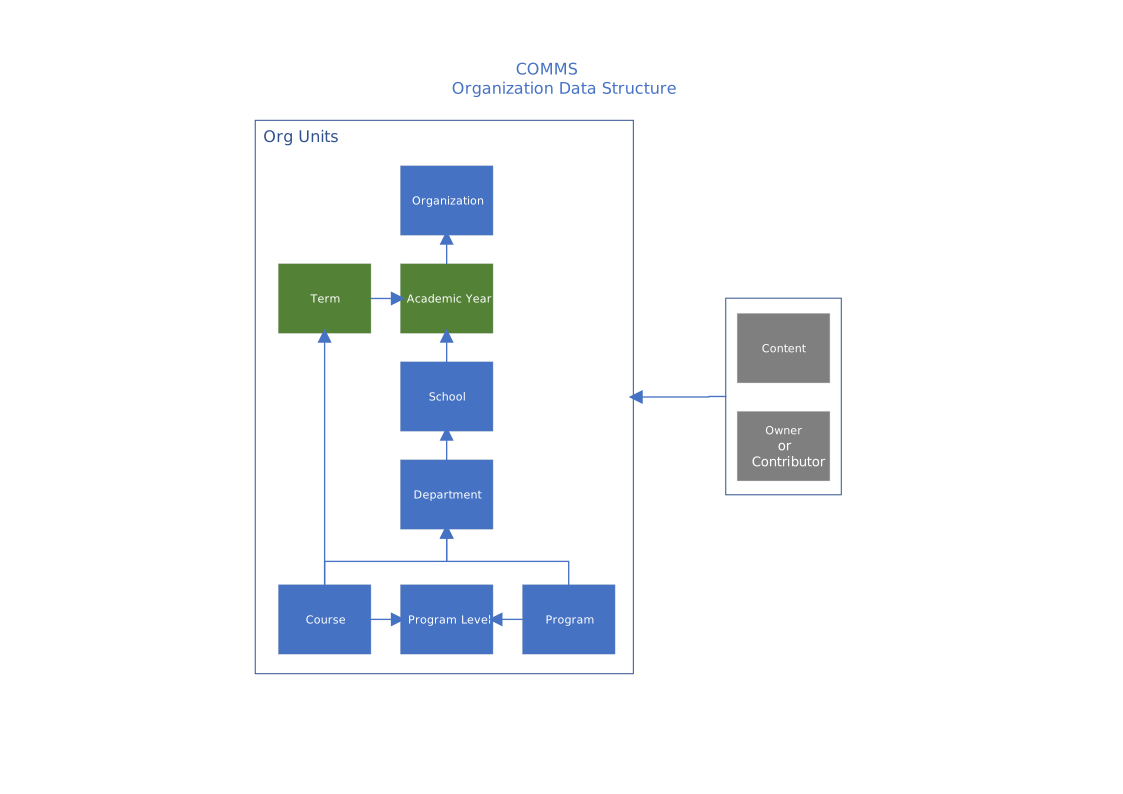
Required Data
The following section describes the data requirements to integrate your college structural information into the COMMS Application. It is assumed that each year your College has predefined set of structural data that changes relatively few times over the course of a complete Academic Year.
School
The School data set provides information about the highest level of organizational information COMMS needs.
Data Fields Needed:
- SchoolCode
- A data key that uniquely identifies a particular school or faculty.
- Name
- The name of the specific school or faculty.
Example Data Required:
schoolcode|name
ATEC|School of Advanced Technology
SHCS|School of Health & Community Studies
Department
The Department data set provides a list of Departments by School.
Data Fields Needed:
- DepartmentCode
- A data key that uniquely identifies a particular Department
- SchoolCode
- A data key that MUST match a SchoolCode provided in Section 'a) School'.
- Name
- The name of the specific Department
- DepartmentChairUsername (Optional)
- The username or usernams of the User(s) responsible for the Programs and Courses that belong to this department. To specify more than one username separate them with commas.
- Example: COMP|ATEC|Information and Communications Technology|antoszj, hawkinw
- If the username of the Department Chair is not available use the value: NULL
- DepartmentChairUsername is no longer a required data field. ETL process will not process DepartmentChairUsername even if it's provided in the data file.
- The username or usernams of the User(s) responsible for the Programs and Courses that belong to this department. To specify more than one username separate them with commas.
Example Data Required (with DepartmentChairUsername):
departmentcode|schoolcode|name|departmentchairusername
COMP|ATEC|Information and Communications Technology|antoszj
CSP|SHCS|Community Service Programs|NULL
Example Data Required (without DepartmentChairUsername):
departmentcode|schoolcode|name
COMP|ATEC|Information and Communications Technology
CSP|SHCS|Community Service Programs
Program
The Program data set provides a list of Programs by Department.
Data Fields Needed:
- ProgramCode
- A data key that uniquely identifies a particular Program
- DepartmentCode
- A data key that MUST match a DepartmentCode provided in Section 'B) Department'.
- ShortTitle
- The Short or abbreviated title of the Program
- LongTitle
- The Long or full title of the Program
- FullTimePartTime
- The Full Time or Part Time indicator of the Program
- Only acceptable values: F, P
- ProgramVersionIndicator
- A data key that uniquely identifies a program version. If two or more programs are running concurrently with the same program code ProgramVersionIndicator can be used to uniquely identify and separate the two program streams.
- NOTE: the field is a text field of up to 50 characters. Common use cases may be the Programs Start Date, or Version Number
- NOTE: If a program version indicator is not required the field may be left blank or match exactly the ProgramCode field.
- NOTE: ProgramCode and ProgramVersionIndicator make up the tables composite primary key.
Example Data Required:
programcode|departmentcode|shorttitle|longtitle|fulltimeparttime|programversionindicator
0006X01FWO|COMP|CET - Computer Science|Computer Engineering Technology - Computer Science|P|01-sep-12
0006X01FWO|COMP|CET - Computer Science|Computer Engineering Technology - Computer Science|P|01-sep-13
51228|CSP|Educational Support Program|Educational Support Program|F|51228
Or without the programversionindicator
programcode|departmentcode|shorttitle|longtitle|fulltimeparttime|programversionindicator
0006X01FWO|COMP|CET - Computer Science|Computer Engineering Technology - Computer Science|P|
Course
The Course data set provides the list of Courses by Department. A Course MUST be owned by a Department so that there is exactly one Department Chair responsible for the content of the course's Course Outline.
Data Fields Needed:
- CourseCode
- A data key that uniquely identifies a particular Course
- DepartmentCode
- A data key that MUST match a DepartmentCode provided in Section 'B) Department'.
- ShortTitle
- The Short or abbreviated title of the Course.
- LongTitle
- The Long or full title of the Course
- Description
- The formal description of the Course used for publication.
- IsGeneralEducation
- A flag that determines if the Course is defined as General Education or not.
- Only acceptable values: true, false
- Hours
- The total number of deliverable Course hours.
Example Data Required:
coursecode|departmentcode|shorttitle|longtitle|description|isgeneraleducation|hours
CST8223|COMP|.NET Programming|.NET Programming|This is the formal description of .NE...|false |75
CS007|CSP|Persuasive Writing|Persuasive Writing|With a thematic focus on current i... |true|45
Optional Data Fields
Grade Scheme Id
If a College would like to supply a Grade Scheme Id they may do so by supplying GradeSchemeId as an argument in the file.
- GradeSchemeId
- The identifier used indentify a specific grading scheme to use for the course.
Example Data Required:
coursecode|departmentcode|shorttitle|longtitle|description|isgeneraleducation|hours|gradeschemeid
CST8223|COMP|.NET Programming|.NET Programming|This is the formal description of .NE...|false |75|1
CS007|CSP|Persuasive Writing|Persuasive Writing|With a thematic focus on current i... |true|45|2
Additional Hours
If a College would like to supply both the CreditHours and the ContactHours for a Course they may do so by first replacing "Hours" above with CreditHours and then supplying ContactHours as an argument in the file.
- CreditHours
- The total creditable hours a student will have gained within this Course.
- ContactHours
- The total number of hours a student will be engaged with the Course and the instructor.
Example Data Required:
coursecode|departmentcode|shorttitle|longtitle|description|isgeneraleducation|credithours|gradeschemeid|contacthours
CST8223|COMP|.NET Programming|.NET Programming|This is the formal description of .NE...|75|NULL
CS007|CSP|Persuasive Writing|Persuasive Writing|With a thematic focus on current i...|43|3|48
Course Version
A version code can also optionally be applied to each Course in the Course data file. This version code allows more the one version of a Course to be running at one time. A good example would be if a Course was redeveloped and both the old version and new version of the Course had the same CourseCode the CourseVersion would be used to distinguish the two versions of the course. To include an optional Course version add a column of data for each Course titled CourseVersion. Then for each Course record that follows supply a text based version code which can contain anything a college would like to use. If this field is left blank for a Course COMMS will assume there is only one version of this Course.
- CourseVersion
- A text based version code up to the maximum length of 50 characters.
Example Data Required:
coursecode|departmentcode|shorttitle|longtitle|description|isgeneraleducation|hours|gradeschemeid|courseversion
CST8223|COMP|.NET Programming|.NET Programming|This is the formal description of .NE...|75|NULL|2015-2016
CS007|CSP|Persuasive Writing|Persuasive Writing|With a thematic focus on current i...|45|3|version2
Grading System Ind and Grading System Desc
If a College would like to use an external system to supply course grading information, instead of maintaining it in COMMS, they may do so by including the following additional columns in the file:
- GradingSystemInd
- GradingSystemDesc
The GradingSystemInd (Grading System Indicator) column value is an integer that uniquely identifies the course grading scheme in the external system, i.e. 1, 2, etc.
The GradingSystemDesc () column value is a string that describes the course grading scheme in the external system, i.e. "A+ Through F", "Pass/Fail", etc.
Example Data Required:
coursecode|departmentcode|shorttitle|longtitle|description|isgeneraleducation|hours|gradingsystemind|gradingsystemdesc
CST8223|COMP|.NET Programming|.NET Programming|This is the formal description of .NE...|false|43.00|1|A+ Through F
Course Co-Requisites
The Course Co-Requisites data set provides a breakdown of the co-requisites for each course.
Note: Not every course has co-requisites.
Data Fields Required:
- CourseCode
- A data key that MUST match a CourseCode provided in Section 'D) Course'.
- CoRequisiteCourseCode
- A data key that MUST match a CourseCode provided in Section 'D) Course'.
- Sequence
- Sequence allows you to define OR and AND while providing Co-Requisites.
- If any two sequence numbers in a row are the same value an AND is performed.
- If any two sequence numbers in a row are of increasing value an OR is performed.
- For example, consider the following data set:
CourseCode1 has the following Co-RequisitesCourseCode1|CoRequisiteCourseCode1|1 CourseCode1|CoRequisiteCourseCode2|1 CourseCode1|CoRequisiteCourseCode3|2 CourseCode1|CoRequisiteCourseCode4|2 CourseCode1|CoRequisiteCourseCode5|3CoRequisiteCourseCode1 _AND_ CoRequisiteCourseCode2 _OR_ CoRequisiteCourseCode3 _AND_ CoRequisiteCourseCode4 _OR_ CoRequisiteCourseCode5
- OrderNumber
- OrderNumber allows you to define the ordering of the Co-Requisite course codes AFTER the Sequence value is applied.
- For example, consider the following data set:
You'll notice that the co-requisite course code that starts with B comes before the co-requisite course code that starts with A.CourseCode1|BCoRequisiteCourseCode1|1|1 CourseCode1|ACoRequisiteCourseCode2|1|2 CourseCode1|XCoRequisiteCourseCode3|2|3 CourseCode1|CCoRequisiteCourseCode4|2|4 CourseCode1|CoRequisiteCourseCode5|3|5
Example Data Required:
coursecode|corequisitecoursecode|sequence|ordernumber
CourseCode1|CoRequisiteCourseCode1|1|1
CourseCode1|CoRequisiteCourseCode2|1|2
CourseCode1|CoRequisiteCourseCode3|2|3
CourseCode1|CoRequisiteCourseCode4|2|4
CourseCode1|CoRequisiteCourseCode5|3|5
Optional Data Fields
Subsequence
Subsequence allows you to define an OR operation as an argument to an AND operation. Each different Subsequence number within the same Sequence number will perform an OR on arguments of an AND operation.
An example:
Using the example supplied above we could write the CoRequisites for the Course as
CoRequisiteCourseCode1 AND CoRequisiteCourseCode2 OR
CoRequisiteCourseCode3 AND CoRequisiteCourseCode4 OR
CoRequisiteCourseCode5`
Subsequence allows you to group an OR which would look like this
(CoRequisiteCourseCode1 OR CoRequisiteCourseCode6)
AND CoRequisiteCourseCode2 OR
CoRequisiteCourseCode3 AND CoRequisiteCourseCode4 OR
CoRequisiteCourseCode5
You can now break down AND operations to an OR operation as argument.
Example Data Required:
coursecode|corequisitecoursecode|sequence|ordernumber|subsequence
CourseCode1|CoRequisiteCourseCode1|1|1|1
CourseCode1|CoRequisiteCourseCode6|1|2|1
CourseCode1|CoRequisiteCourseCode2|1|3|
CourseCode1|CoRequisiteCourseCode3|2|4|
CourseCode1|CoRequisiteCourseCode4|2|5|
CourseCode1|CoRequisiteCourseCode5|3|6|
Course Version
A version code can also optionally be applied to each Corequisite in the Corequisite data file. This version code allows Corequisite to be added to Courses which use the CourseVersion field. To include an optional Course version add a column of data for each Course titled CourseVersion. Then for each Corequisite record that follows supply a text based version code which can contain anything a college would like to use. If this field is left blank for a Course COMMS will assume there is only one version of this Course.
- CourseVersion
- A text based version code up to the maximum length of 50 characters. Must match a Course Version from section d) Course.
Example Data Required:
coursecode|corequisitecoursecode|sequence|ordernumber|courseversion
CourseCode1|CoRequisiteCourseCode1|1|1|2015-2016
CourseCode1|CoRequisiteCourseCode2|1|2|2015-2016
CourseCode1|CoRequisiteCourseCode3|2|3|version2
CourseCode1|CoRequisiteCourseCode4|2|4|
CourseCode1|CoRequisiteCourseCode5|3|5|
Course Pre-Requisites
The Course Pre-Requisites data set provides a breakdown of the pre-requisites for each course.
Note: Not every course has pre-requisites.
Data Fields Required:
- CourseCode
- A data key that MUST match a CourseCode provided in Section 'D) Course'.
- PreRequisiteCourseCode
- A data key that MUST match a CourseCode provided in Section 'D) Course'.
- Sequence
- Sequence allows you to define OR and AND while providing Pre-Requisites.
- If any two sequence numbers in a row are the same value an AND is performed.
- If any two sequence numbers in a row are of increasing value an OR is performed.
- For example, consider the following data set:
The data reads as:CourseCode1|PreRequisiteCourseCode1|1 CourseCode1|PreRequisiteCourseCode2|1 CourseCode1|PreRequisiteCourseCode3|2 CourseCode1|PreRequisiteCourseCode4|2 CourseCode1|PreRequisiteCourseCode5|3CourseCode1 has the following Pre-Requisites PreRequisiteCourseCode1 AND PreRequisiteCourseCode2 OR PreRequisiteCourseCode3 AND PreRequisiteCourseCode4 OR PreRequisiteCourseCode5
- OrderNumber
- OrderNumber allows you to define the ordering of the pre-requisite course codes AFTER the Sequence value is applied.
- For example, consider the following data set:
You'll notice that the pre-requisite course code that starts with B comes before the pre-requisite course code that starts with A.CourseCode1|BPreRequisiteCourseCode1|1|1 CourseCode1|APreRequisiteCourseCode2|1|2 CourseCode1|XPreRequisiteCourseCode3|2|3 CourseCode1|CPreRequisiteCourseCode4|2|4 CourseCode1|PreRequisiteCourseCode5|3|5
- CourseVersion (optional)
- A unique data field which specifics the version of this course. This can be a text field and it is used to differentiate different versions of the same course using the same course code. If left blank COMMS will assume there is only one version of every course.
Example Data Required:
coursecode|prerequisitecoursecode|sequence|ordernumber
CourseCode1|prerequisitecoursecode1|1|1
CourseCode1|prerequisitecoursecode2|1|2
CourseCode1|prerequisitecoursecode3|2|3
CourseCode1|prerequisitecoursecode4|2|4
CourseCode1|prerequisitecoursecode5|3|5
Optional Data Fields
Subsequence
Subsequence allows you to define an OR operation as an argument to an AND operation. Each different Subsequence number within the same Sequence number will perform an OR on arguments of an AND operation.
An example:
Using the example supplied above we could write the PreRequisites for the Course as
PreRequisiteCourseCode1 AND PreRequisiteCourseCode2 OR
PreRequisiteCourseCode3 AND PreRequisiteCourseCode4 OR
PreRequisiteCourseCode5
Subsequence allows you to group an OR which would look like this
(PreRequisiteCourseCode1 OR PreRequisiteCourseCode6)
AND PreRequisiteCourseCode2 OR
PreRequisiteCourseCode3 AND PreRequisiteCourseCode4 OR
PreRequisiteCourseCode5
You can now break down AND operations to an OR operation as argument.
Example Data Required:
coursecode|prerequisitecoursecode|sequence|ordernumber|subsequence
CourseCode1|PreRequisiteCourseCode1|1|1|1
CourseCode1|PreRequisiteCourseCode6|1|2|1
CourseCode1|PreRequisiteCourseCode2|1|3|
CourseCode1|PreRequisiteCourseCode3|2|4|
CourseCode1|PreRequisiteCourseCode4|2|5|
CourseCode1|PreRequisiteCourseCode5|3|6|
Course Version
A version code can also optionally be applied to each Prerequisite in the Prerequisite data file. This version code allows Prerequisites to be added to Courses which use the CourseVersion field. To include an optional Course version add a column of data for each Course titled CourseVersion. Then for each Prerequisite record that follows supply a text based version code which can contain anything a college would like to use. If this field is left blank for a Course COMMS will assume there is only one version of this Course.
- CourseVersion
- A text based version code up to the maximum length of 50 characters. Must match a Course Version from section d) Course.
Example Data Required:
coursecode|prerequisitecoursecode|sequence|ordernumber|courseversion
CourseCode1|prerequisitecoursecode1|1|1|2015-2016
CourseCode1|prerequisitecoursecode2|1|2|2015-2016
CourseCode1|prerequisitecoursecode3|2|3|version2
CourseCode1|prerequisitecoursecode4|2|4|
CourseCode1|prerequisitecoursecode5|3|5|
ProgramLevel
The ProgramLevel data set joins the Course and Program information together. The data set is a comprehensive list of Programs, their courses, and which order they should be taken by students.
Data Fields Needed:
- ProgramCode
- A data key that MUST match a ProgramCode provided in Section 'C) Program'
- CourseCode
- A data key that MUST match a CourseCode provided in Section 'D) Course'
- IsCore
- A flag that determines if the course is used as a Core of Elective course.
- Only acceptable values: true, false. True if the Course is a Core course.
- Level
- An integer value corresponding to the level at which the course is taught.
- Sequence
Sequence allows a Program progression that may differ from the standard academic program delivery. For instance, a Program may have a Co-op term which falls outside of the progression of the standard delivery mode. The Co-op term makes the progression through the program one semester longer than the standard delivery. This extra term is denoted within the sequencing of the courses. ProgramLevel examples:
Identical Sequence Numbers Differing Sequence Numbers Fall Semester – 4 Courses, Level 1, Sequence 1 Fall Semester – 4 Courses, Level 1, Sequence 1 Winter Semester – 5 Courses, Level 2, Sequence 2 Winter Semester – Co-op, Level 1, Sequence 2 Spring Semester – 5 Courses, Level 2, Sequence 3 If the College does not make a distinction to allow for such an occurrence set the Sequence field to the same value as the Level field.
- ProgramVersionIndicator
- A data key that MUST match a ProgramVersionIdicator provided in Section 'C) Program'
- NOTE: ProgramCode and ProgramVersionIndicator make up the tables composite primary key
Example Data Required:
programcode|coursecode|iscore|level|sequence|programversionindicator
0006X01FWO|CST8223|true|5|5|01-sep-2012
0006X01FWO|CST8223|true|5|5|01-sep-2013
51228|CS007|true|1|1|51228
Optional Data Fields
Course Version
A version code can also optionally be applied to each Program Level in the Program Level data file. This version code allows more the one version of a Course to be running at one time and to be linked with different Programs. Then for each Program Level record supply a text based version code which can contain anything a college would like to use. If this field is left blank for a Course COMMS will assume there is only one version of this Course.
- CourseVersion
- A text based version code up to the maximum length of 50 characters. Must match a Course Version from section d) Course.
Example Data Required:
programcode|coursecode|iscore|level|sequence|programversionindicator|courseversion
0006X01FWO|CST8223|true|5|5|01-sep-2012|2015-2016
0006X01FWO|CST8223|true|5|5|01-sep-2013|version2
51228|CS007|true|1|1|51228|
Minimum Course Grade Required
A string containing the minimum letter grade required in the program level to progress to the next level.
Example Data Required:
programcode|coursecode|iscore|level|sequence|programversionindicator|minimumcoursegraderequired
0006X01FWO|CST8223|true|5|5|01-sep-2012|D-
0006X01FWO|CST8223|true|5|5|01-sep-2013|C+
Vocational Learning Outcomes
The Vocational Learning Outcomes data will load Vocational Learning Outcomes into an existing Program within COMMS.
Data Fields Needed:
- ProgramCode
- A data key that MUST match a ProgramCode provided in Section 'C) Program'
- ProgramVersionIndicator (Optonal)
- A data key that MUST match a ProgramVersionIdicator provided in Section 'C) Program'. If this field is left blank then COMMS will assume ProgramVersionIndicator is the same as the ProgramCode.
- NOTE: ProgramCode and ProgramVersionIndicator make up the tables composite primary key.
- Sequence
- Sequence allows the Vocational Learning Outcomes to be ordered properly.
- Description
- A text description of the Vocational Learning Outcome.
Example Data Required:
programcode|programversionindicator|sequence|description
0006X01FWO|0006X01FWO|1|This is a VLO for a Program
0006X01FWO|0006X01FWO|2|This is the second VLO for a Program
Optional Data
Term Course
At this time, support for Terms is limited to report generation. An optional file can be provided to let COMMS know the relationship between Term and Course. Only two data fields are required.
Data Fields Needed:
- Term
- A text string with the name of a unique term, the maximum length is 50 characters.
- CourseCode
- A data key that MUST match a CourseCode provided in Section 'D) Course'.
- CourseVersion (optional)
- A text based version code up to the maximum length of 50 characters. Must match a Course Version from section d) Course (only include this column if course versions were provided in the "Course" file).
Example Data Required:
term|coursecode
2018F|ACC0004
2018F|FIN2303
2018W|LAW1104
2018W|IMD1001
Example with Course Version:
term|coursecode|courseversion
2018F|ACC0004|18F
2018F|FIN2303|18F
2018W|LAW1104|18W
2018W|IMD1001|18W
Deliverable
To integrate your SIS data into COMMS you will need to provide the COMMS Administrator with the preceding data sets. Each file should be pipe delimited, and each line of the file should contain a separate entry. The first row in each file must contain the header.
Follow the examples provided in each section.
For manual import, please zip up the files and send them to the COMMS Team, comms@algonquincollege.com
Automation (Optional)
COMMS can be configured in such a way that the data files are automatically added to the system. The process is as follows:
- The organization has automated the creation of the data files.
- The data files are sent to an FTP server on a regular basis.
- It is up to the organization to decide how often the data should be refreshed.
- Please contact the COMMS Team for credentials and hosting information.
- COMMS will automatically import any files found on the FTP server daily at 6 AM EST.
- Please note that the new data will Create new entries, Update existing entries and Hide all entries that are not in the file (COMMS will never delete data, only hide it from use).